


DVI Connector Types Comparison
DVI (Digital Visual Interface) connectors are available in several configurations depending on whether they support digital signals, analog signals, or both. Understanding the differences between DVI-I, DVI-D, and DVI-A, as well as single-link and dual-link variants, can help you choose the correct cable or adapter for your monitor, graphics card, or display equipment.
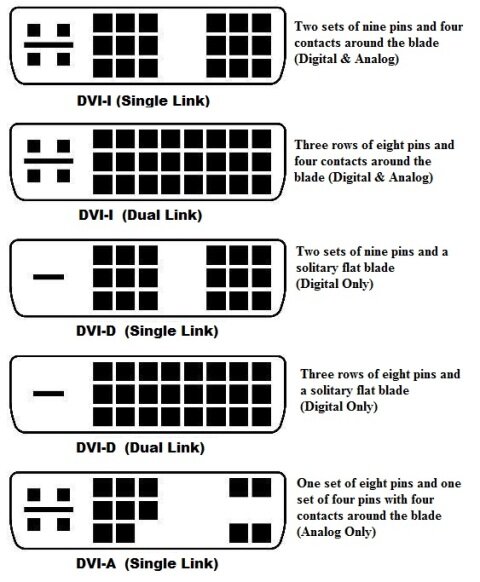
The comparison chart below provides a quick visual reference for the most common DVI connector types and their supported signal formats.
Quick Overview of DVI Connector Types
- DVI-I (Single Link): Supports both digital and analog signals with a single-link pin configuration.
- DVI-I (Dual Link): Supports both digital and analog signals while providing additional pins for higher resolutions and bandwidth.
- DVI-D (Single Link): Supports digital signals only and is commonly used for standard-resolution digital displays.
- DVI-D (Dual Link): Supports digital signals only with increased bandwidth for higher resolutions and refresh rates.
- DVI-A (Single Link): Supports analog signals only and is primarily used with legacy display equipment.
Choosing the Right DVI Connector
When selecting a DVI cable or adapter, verify the connector type on both your source device and display. While some DVI connectors are physically compatible with one another, signal compatibility depends on whether the connection supports digital, analog, or both types of video transmission. Matching the correct connector helps ensure reliable display performance and prevents compatibility issues.


