



How to Make a Cat5e Patch Ethernet Cable
Creating your own Cat5e Ethernet patch cable is an easy way to build custom-length network cables for home, office, and commercial installations. By following the proper wiring sequence and termination process, you can create reliable Ethernet cables that deliver consistent network performance.
Step 1
This procedure generally applies to Cat5e RJ45 connectors.
An alternate method is provided for connectors utilizing a load bar.
See: Connectors
Step 2
Cut the cable to the desired length.
If you plan to use snagless boots, this is the best time to slide them onto the cable.
Be sure the boots will face outward toward the connector.
See: Snagless Boots
Step 3
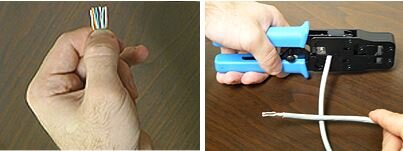
Strip back approximately one inch of the cable jacket.
Use the cutter provided with the crimping tool or carefully strip the jacket by hand.
Be careful not to nick the individual wires.
Untwist each of the four wire pairs and straighten each wire as much as possible between your fingers.
Step 4
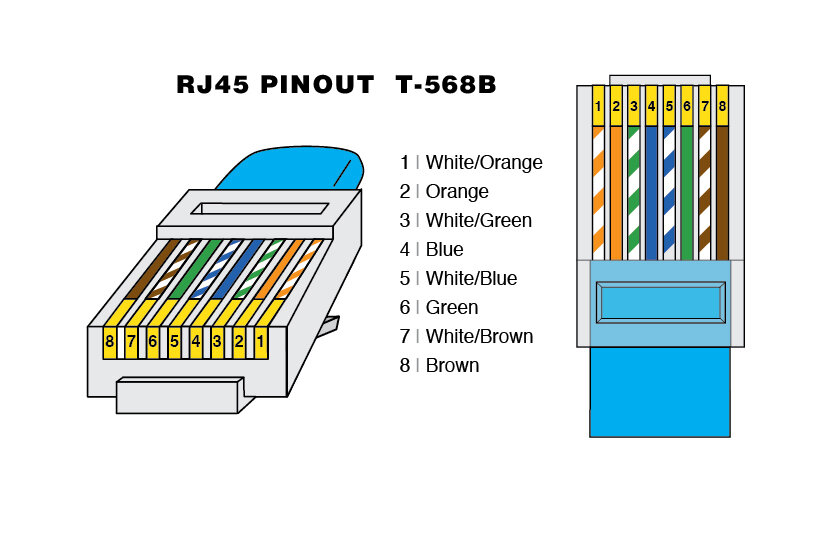
Use the T568B wiring scheme on both ends for a standard Ethernet patch cable.
Step 5
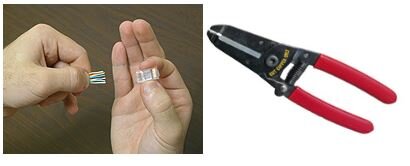
Bring all of the wires together as closely as possible.
Hold the grouped and sorted wires tightly between your thumb and forefinger.
Cut all of the wires at a perfect 90-degree angle approximately 1/2 inch from the end of the cable jacket.
Use a sharp cutting tool so the wire ends are not crushed.
Step 6
With the connector pins facing upward, carefully insert the wires into the connector.
Apply moderate pressure so the wires are fully seated against the contacts inside the connector.
Alternate Method for Load Bar Connectors
A.
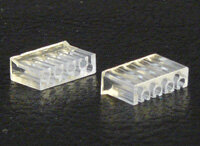
Note that the load bar has slots on one side with a flanged edge on one end.
The slotted side should face the pins inside the connector.
The wires are inserted into the flanged end.
B.
Hold the grouped and sorted wires tightly between your thumb and forefinger.
Cut all of the wires at a sharp angle from the cable.
Use a sharp cutting tool so the wire ends are not crushed.
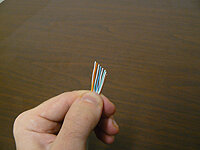
C.
Hold the load bar so the staggered holes face toward the cable.
Insert the wires through the load bar one at a time, carefully maintaining the proper wire orientation.
Slide the load bar as far down as possible.

D.
Cut off the excess wire ends with a straight cut approximately 0.25 inches past the load bar.
With the connector pins facing upward, slide the load bar assembly into the connector.
Ensure the wires are firmly seated at the end of the connector.
The brown wire pair should be positioned on the right side.
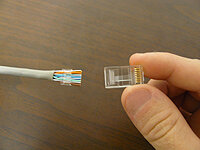
Step 7
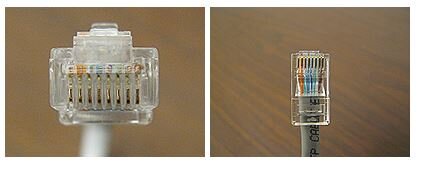
Observe the tip of the connector to confirm that all wires are fully inserted.
The end of each wire should be clearly visible.
There should be enough of the cable jacket inside the connector for the crimp to securely grip it.
Tip: Slide the load bar forward as needed to achieve the ideal wire placement.
Step 8
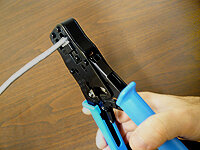
Place the connector into the crimp tool and squeeze firmly until the handle reaches its full travel.
See: Crimping Tools
Step 9
Repeat the process on the opposite end using the desired wiring scheme.
Be sure to slide the snagless boots snugly over the connectors when finished.
Step 10
Always use a cable tester to check for continuity, opens, and shorts.
See: Cable Testers

Step 11
Building patch cables takes practice, so keep at it until you master your technique.
Download: How to Make a Cat5 Patch Cable
Questions or Comments?
Give us a shout at 866-738-8993.


