


HDMI Extender Diagram
HDMI extenders provide a simple solution for transmitting high-definition video and audio over longer distances than a standard HDMI cable alone. They are commonly used in home theaters, conference rooms, digital signage, classrooms, and commercial AV installations where the source device and display are separated by a greater distance.
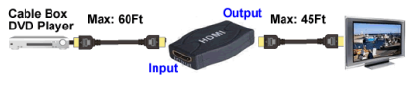
The diagram below illustrates a typical HDMI extender setup and the recommended cable lengths between the source device, extender, and display.
How an HDMI Extender Works
An HDMI source device, such as a cable box or DVD player, connects to the HDMI extender using an HDMI cable. The extender then transmits the signal to the display while maintaining high-definition video and audio quality over a greater overall distance.
In the example shown below, the source device can be connected using an HDMI cable up to 60 feet in length, while the display can be connected with an HDMI cable up to 45 feet from the extender.
HDMI Extender Features
The HDMI extender shown in the diagram offers the following features:
- Allows HDMI cable runs up to 115 feet (35 meters).
- Daisy chain support for up to two units.
- 1080p compatible with 3D support.
- Supports the DDWG standard for HDMI monitors.
- Supports full HDMI audio and video.
- HDCP compliant.
- RoHS compliant.
Typical Applications
HDMI extenders are commonly used for:
- Home theater systems.
- Conference rooms.
- Digital signage installations.
- Commercial AV systems.
- Classroom display systems.
- Equipment racks located away from displays.
Choosing the Right HDMI Extension Solution
Before selecting an HDMI extender, consider the total cable distance, video resolution requirements, HDCP compatibility, and whether additional features such as daisy chaining are needed for your installation.


